





The PLS Mobile App

Schedule your meetings, navigate the exhibition floor, and keep track of every contact, from the first interaction to the last.

Make the Most of PLS

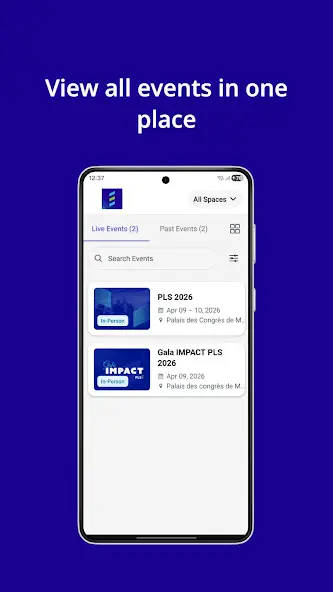
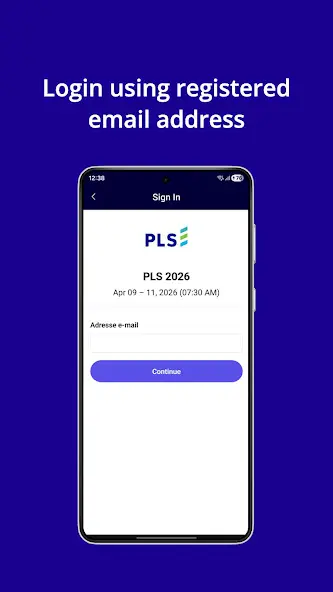
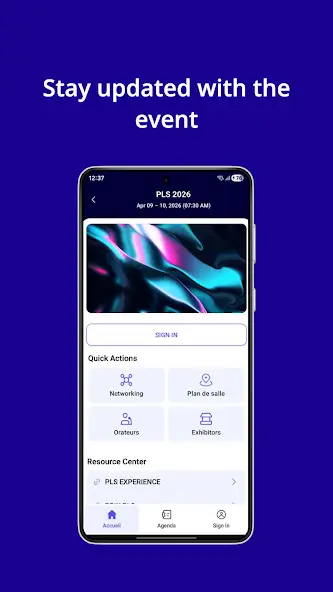
The PLS mobile app accompanies you every step of the way. Complete your profile to become visible to other participants, browse the schedule and floor plan, plan your meetings, and exchange contact information with a simple scan. Chat in real time and earn points along the way. One tool to make every moment at PLS count and last.

FEATURES

Everything You Need, All in One Place

My Tickets

Your ticket is always accessible in the app, wherever you are during the event.

My Briefcase

My Briefcase brings together your favourites: sessions, speakers and exhibitors you want to see or meet. You can also access documents and take notes.

Contacts

Access your list of contacts, profiles and contact details for everyone whose badge you scanned during the event.

Connect with PLS

Browse the list of participants who have made their profiles visible to everyone and find the people you’d like to meet.

Speakers

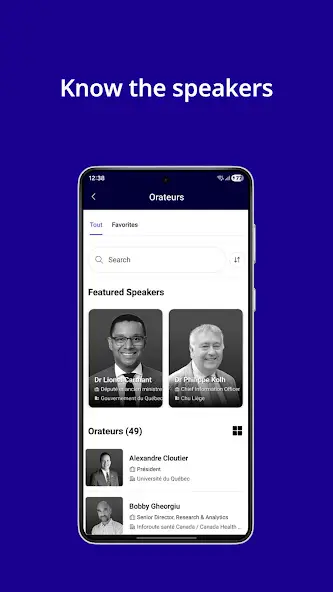
Browse the list of participants who have made their profiles visible to everyone and find the people you’d like to meet.

Meetings

Create your meeting schedule, access it anytime, and respond to meeting requests from other participants.

Location

View the event venue, get directions to the Palais des congrès, and access practical information about the venue.

Schedule

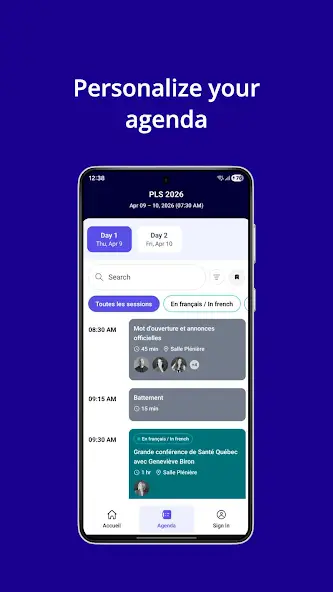
Explore the full PLS schedule by time, session type and language to choose the sessions that matter most to you.

Scan

Scan the QR code on a participant’s badge to save their contact details in one simple step, without exchanging business cards.

Message

Message any participant directly through the app to confirm a meeting or continue a conversation.

Profile

Update your profile and preferred language, and choose whether to make your profile visible to other participants.

Who Is It For?

Participants

You’re attending PLS to connect with others and discover new solutions. The app helps you make the most of your experience with access to the schedule, meetings, contacts, tickets and logistical information. You can also retrieve your ticket and certificate of attendance after the event.

Exhibitors and Partners

Your visibility presence comes to life in the app. Invite your colleagues, schedule meetings at your booth or in CONNECT PLS, scan badges and qualify your leads. Every interaction becomes a business opportunity you can track.

Decision-Makers
and Executives

Decision-Makers
and Executives

Elected representatives
Ministers
Deputy Ministers
Senior Executives

Healthcare Professionals

Elected representatives
Ministers
Deputy Ministers
Senior Executives

Managers and Organizations

Elected representatives
Ministers
Deputy Ministers
Senior Executives

Innovation and Technology

Elected representatives
Ministers
Deputy Ministers
Senior Executives

Investors and Business Ecosystem

Elected representatives
Ministers
Deputy Ministers
Senior Executives

CONTEST

Become a Committed Changemaker

At PLS, every interaction counts. Earn points by participating in activities and engaging with others for a chance to win one of three « Committed Changemaker » awards. The more you contribute to the energy of PLS, the more rewarding your experience becomes.

GET MY TICKET

FAQ

What Is the PLS Mobile App?
Every year, PLS brings together political decision-makers, managers, healthcare professionals, and industry partners committed to advancing primary care and frontline healthcare in Canada. Its flagship event takes place every spring, while activities and forums continue throughout the year through Beyond PLS.
Is the app free?
Yes. The PLS mobile app is free to download. Once installed, you’ll have access to your ticket, the full schedule, your meetings, and all the tools you need to plan and make the most of your PLS experience. https://youtube.com/shorts/w3W_pcnrvxI?feature=share
When Is the App Available?
The PLS mobile app is available year-round. All its features become accessible three weeks before the event, giving you plenty of time to set up your profile, schedule meetings, and plan your agenda before you even arrive. https://youtube.com/shorts/w3W_pcnrvxI?feature=share
How Do I Schedule a Meeting Using the App?
Find the person in Connect PLS and send them a meeting request. Your meeting schedule and incoming requests are available in the Meetings section. You can also use Messages to confirm the details. https://youtube.com/shorts/MUrl7y9hBgQ?feature=share
How Do I Exchange Contact Information?
Use the Scan feature to scan the QR code on the other participant’s badge. Their details will be added to your Contacts list, which you can access during and after the event, with no need to exchange business cards. https://youtube.com/shorts/7a7e8RkPG6Y?feature=share
How Do I View the List of Participants?
The list of participants who have made their profiles visible to everyone is available through the Connect PLS feature. To appear on the list, update your profile in the app and choose to make it visible to other participants.
How Do I Invite My Colleagues to My Booth?
Log in to your exhibitor space in the app, then invite your colleagues to join your booth. This allows your entire team to take part in meetings and welcome visitors.
How Does the “Committed Changemaker” Contest Work?
Earn points by taking part in on-site activities and interactions. The three “Committed Changemaker” awards are presented based on the total points accumulated. The more you participate, the more points you earn.
Can I Transfer My Ticket to Someone Else?
Yes. You can transfer your ticket to another person directly through the PLS mobile app, just like a concert ticket. The transfer can be completed from your account. https://bit.ly/4rxamqN
How Do I Get My Certificate of Attendance?
You can access your certificate of attendance through the app after the event. It does not count as formal continuing education credits, but the content is recognized, and your employer may consider PLS a professional development activity.
Do you need more information or would you like to get in touch with our team?

info@productionsplakett.ca